Models

You choose the model, and connect it one of three ways

Add a provider in Settings → Model and save each card. The model list is fetched from the provider, cached, and refreshed once per run or when you press refresh.
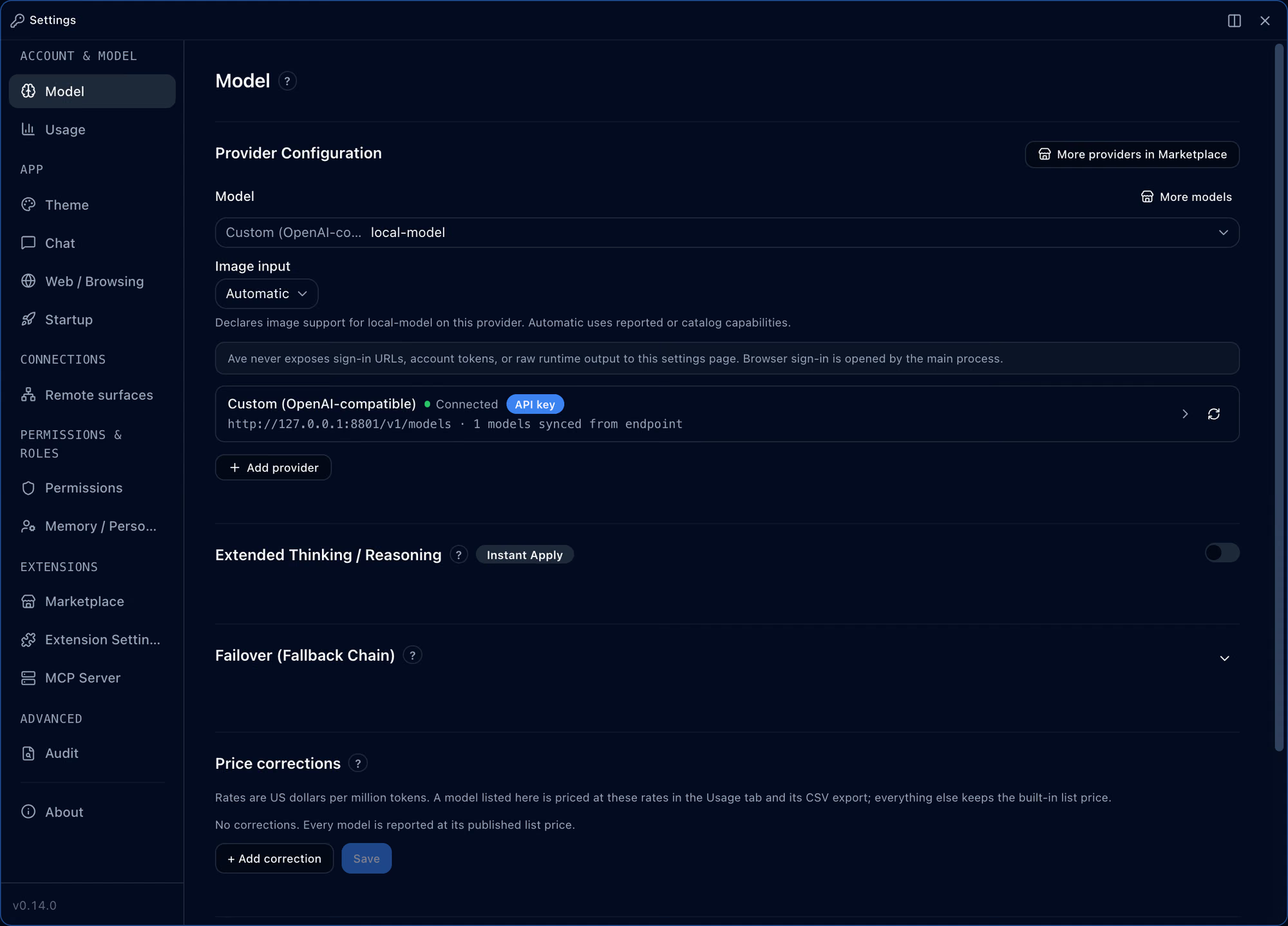
The Model settings with a custom OpenAI-compatible provider shown as connected, followed by reasoning and fallback settings

Three ways to connect

Whichever way you connect, there is one model chooser, grouped by provider.

API key

With a provider key

  • Built in: OpenAI, Claude, Gemini, OpenRouter
  • Other providers as marketplace provider packages
  • OpenAI also through API-key chat

Your own server

An OpenAI-compatible endpoint

  • A local or company server, by address
  • The model list syncs from the endpoint
  • Declare image input support yourself if needed

Subscription

ChatGPT and Claude plans

  • ChatGPT: sign in in the browser or with a device code, through the codex CLI you installed, run in isolation
  • Claude: the official claude CLI Ave discovers automatically, with an app-owned config folder
  • Subscription credentials never become API keys

Providers

Every provider the app knows

Read at build time from the app’s own provider list. Five ship in the app; the rest are added as provider packages from the official marketplace and then connected in Settings → Model.

Built in 5

  • Anthropic Claude
  • OpenAI
  • Google Gemini
  • OpenAI-compatible (custom)No key needed
  • OpenRouteropenrouter.aiGateway

Added as a provider package 35

  • Azure AI Foundrypackage 1.0.1
  • Google Vertex AIpackage 1.0.1
  • DeepSeekapi.deepseek.compackage 1.0.1
  • xAIapi.x.aipackage 1.0.1
  • Together AIapi.together.xyzpackage 1.0.1
  • Fireworks AIapi.fireworks.aipackage 1.0.1
  • Groqapi.groq.compackage 1.0.1
  • Poolsideinference.poolside.aipackage 1.0.1
  • Cerebrasapi.cerebras.aipackage 1.0.1
  • SambaNovaapi.sambanova.aipackage 1.0.1
  • Nebiusapi.tokenfactory.nebius.compackage 1.0.1
  • Baseteninference.baseten.copackage 1.0.1
  • Requestyrouter.requesty.aiGatewaypackage 1.0.1
  • LiteLLMlocalhost:4000GatewayNo key neededpackage 1.0.1
  • Hugging Facerouter.huggingface.coGatewaypackage 1.0.1
  • Vercel AI Gatewayai-gateway.vercel.shGatewaypackage 1.0.1
  • Vercel V0api.v0.devpackage 1.0.1
  • AI Hub Mixapi.aihubmix.comGatewaypackage 1.0.1
  • HiCapapi.hicap.aipackage 1.0.1
  • Nous Researchinference-api.nousresearch.compackage 1.0.1
  • Huawei Cloud MaaSinfer-modelarts.cn-southwest-2.myhuaweicloud.compackage 1.0.1
  • W&B by CoreWeaveapi.inference.wandb.aipackage 1.0.1
  • Xiaomiapi.xiaomimimo.compackage 1.0.1
  • Kilo Gatewayapi.kilo.aiGatewaypackage 1.0.1
  • Z.AIapi.z.aipackage 1.0.1
  • Z.AI Coding Planapi.z.aipackage 1.0.1
  • Alibaba Qwendashscope.aliyuncs.compackage 1.0.1
  • Alibaba Qwen Codedashscope.aliyuncs.compackage 1.0.1
  • Doubaoark.cn-beijing.volces.compackage 1.0.1
  • Mistralapi.mistral.aipackage 1.0.1
  • Moonshotapi.moonshot.aipackage 1.0.1
  • AskSageapi.asksage.aipackage 1.0.1
  • Ollamalocalhost:11434No key neededpackage 1.0.1
  • LM Studiolocalhost:1234No key neededpackage 1.0.1
  • Oracle Code Assistcode.aiservice.us-chicago-1.oci.oraclecloud.compackage 1.0.1
The composer’s model chooser with local-model selected and a reasoning slider from None to High

From the composer

Change the model and reasoning level mid-conversation

Click the model name under the composer to open the same chooser. For models that reason, set the reasoning level here.

  • Fallback chain. When a model fails, the next one in the chain takes over that turn.
  • No silent switching between routes. A subscription route never quietly falls back to an API-key route.
  • Sign-in stays out of settings. Sign-in URLs and tokens never appear on the settings page; browser sign-in is opened by the main process.

Managing providers

Add, check, and know the limits

Provider cards show whether they are connected and how many models were synced. Context windows and output limits come from the app’s bundled model catalog and what the provider reports.

The Add provider menu in the Model settings listing OpenAI, Moonshot, xAI, Claude Code, Anthropic Claude, Google Gemini and OpenRouter

Add provider

Pick a provider such as OpenAI, Anthropic Claude, Google Gemini or OpenRouter from the Add provider menu.

Work mode with three tiles, each holding a different conversation

Each tile on its own loop

Every tile runs its own conversation loop, so several conversations get answers at once.

The audit log table with a turn entry recorded as openai-compatible/local-model

Every turn on record

The audit log records which provider and model each turn ran on.

Work mode where local-model added a --json flag to the export command and reports that all six tests pass

Any model

Change the model, keep the workbench

This conversation ran on local-model, served by an OpenAI-compatible server. Editing files and running tests work the same whichever provider you connect.

  • The host decides tools and approvals. Permission modes, approvals and the OS sandbox apply the same way whatever the model.
  • Long conversations are compacted automatically. When to compact follows the model’s context window from the model catalog.
  • Usage per model. The Usage tab shows tokens and cost per model and exports them as CSV.

Questions

What changes when I connect a Claude subscription?

Ave launches the official claude CLI Ave discovers automatically with an app-owned config folder, and never reads OAuth tokens or reuses API keys. The CLI’s own tools are off; only Ave’s tools are offered, through its MCP bridge. This route has no model choice and no image attachments.

Can I use a model server I run myself?

If it is an OpenAI-compatible endpoint, connect it by address. The model list comes from the server, and you can declare whether it accepts images.

Where does model information come from?

Context windows and output limits come from the public models.dev catalog, fetched at most once a day. No account, key or conversation is sent, and you can turn it off in Settings → Model → Model catalog.

What about a provider that isn’t listed?

Add it as a provider package from a marketplace. The Model tab has a More providers in Marketplace button.

Can I change the usage prices?

Price corrections in the Model tab set dollars per million tokens per model; the Usage tab and its CSV export use those rates.

Read on